
Best AI Journal Apps in 2026: Privacy, Android, iPhone, Free Plans, and Price
By Clifford · Product research
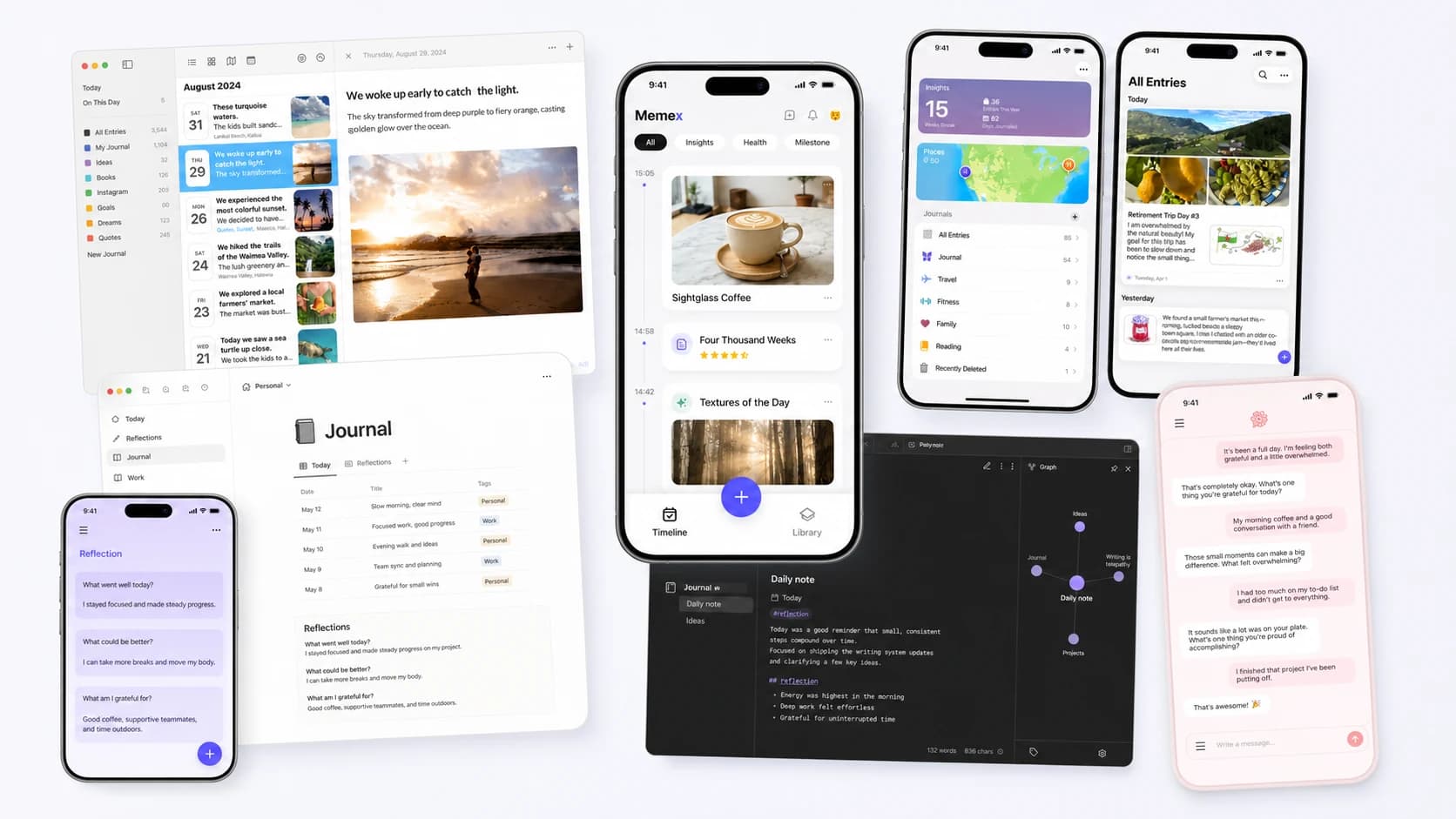
AI journal apps have gone from niche experiments to a real product category. But "AI journaling app" can mean very different things: smart suggestions, coaching prompts, journal-wide search, mood analysis, or AI that quietly organizes your life in the background.
The best AI journal app depends on what you want the AI to do. If you want guided reflection, choose a coaching-style app. If you want to capture photos, voice, and fragmented life records, choose a local-first organizer. If you want the simplest start on iPhone, choose the polished default. This page compares those jobs instead of pretending one app wins for every user.
This comparison covers the decisions people actually make in search: privacy, Android support, iPhone experience, free plans, export, voice notes, and monthly price. It is a buying guide, not a claim that one app is best for every person.
Quick Verdict
The best AI journal app is not the same for every search. Choose Memex if you want an Android and iOS AI journal that captures text, photos, and voice notes, then organizes them into searchable life records; Apple Journal if you want the easiest free iPhone diary, Day One if you want the most polished classic journal, Reflection or Rosebud if you want guided self-reflection, Obsidian if you want local Markdown control, and Notion if you want the strongest AI and agent capabilities inside a broader personal information system.
Best AI journal apps by use case
These apps solve different problems. Some make it easier to keep a daily writing habit; some act like a reflective coach; others prioritize local files, voice and photo capture, or automatic organization. The useful question is not which app is best overall, but which trade-offs match the way you already record your life. Start with the job you want the app to do.
| If you searched for | Shortlist | Why |
|---|---|---|
| AI powered journal app | Memex if you want AI organization; Reflection or Rosebud if you want guided reflection | This query usually means the searcher wants AI to do more than store dated text. Memex is strongest for background organization, while Reflection and Rosebud are stronger for coaching-style prompts. |
| AI journal app / AI journaling app | Memex, Day One, Apple Journal, Notion, Obsidian, Reflection, or Rosebud depending on the job | The broad category splits into five jobs: AI-organized life records, easy daily writing, guided self-reflection, personal information management, and local file control. Memex fits the first one best. |
| Best free journal app for Android | Memex or Apple Journal alternatives | Memex is free at the app level on Android and focuses on local-first capture, photos, voice notes, and AI organization. If you only need simple writing, a basic free diary app may be enough. |
| Best journal app for Android | Memex for AI life records; Day One for classic journaling | Memex is stronger if you want AI agents, voice, photos, and searchable memory. Day One is stronger if you want a polished traditional diary experience. |
| Free online journal / online journal | Memex for private AI memory; a simple web diary for text-only writing | If your online journal search is really about cross-device access plus privacy, prefer local-first storage, export, and searchable memory over a pure cloud diary. |
| Best AI journal app for iPhone | Apple Journal for zero setup; Memex for AI organization | Apple Journal is the easiest free iPhone start. Memex is better if you want cross-record organization, open-source code, and bring-your-own-model AI. |
| Best private AI journal app | Memex, Obsidian, or Apple Journal | Memex and Obsidian give the strongest data ownership story. Apple Journal is privacy-forward inside the Apple ecosystem. |
| Best AI journal app for guided reflection | Reflection or Rosebud | These products are built around prompts, coaching, and conversational self-reflection rather than long-term life-record organization. |
| AI voice journal app | Memex for searchable voice records; Rosebud for conversational voice journaling | Voice intent is about lowering capture friction. Memex is a better fit when the spoken note should become searchable life context; Rosebud is better when voice is mainly part of a guided reflection loop. |
If privacy is the filter you care about most, our guide to choosing a private AI journal app goes deeper on local-first storage, model routing, exports, and how to tell whether a privacy claim is actually meaningful.
How we evaluated these apps
We did not rank these apps by polish alone. For a category this personal, the real questions are what kind of intelligence you get, how much of your data you control, and how much friction stands between you and a daily habit.
Last reviewed on July 30, 2026. We prioritized official product pages, pricing pages, public app listings, and verifiable architecture details over third-party summaries.
- How useful the AI actually is: prompts and summaries are very different from coaching, search, or background organization.
- Privacy and ownership: where the journal lives, whether export is possible, and whether you control the model or provider.
- Setup friction: whether the app works immediately or asks you to assemble templates, plugins, or API keys.
- Breadth of capture: whether the app can handle only reflective writing or also voice, photos, tasks, and knowledge capture.
- Price to usefulness: how much you need to pay before the app becomes genuinely valuable, not just technically usable.
Quick comparison table
If you are scanning search results and just want to shortlist a few AI diary or journaling apps quickly, this table is the high-level view.
| App | Best For | AI Style | Privacy | Price |
|---|---|---|---|---|
| Memex | AI-organized life records with local data | Background multi-agent organization | Local-first + bring your own model | Free app + model usage |
| Day One | Cross-platform, long-form journaling | Prompts, summaries, guided chat | Cloud sync with encryption | Free / Gold $74.99 per year |
| Apple Journal | Simple journaling inside the Apple ecosystem | Smart suggestions, light intelligence | On-device + iCloud | Free |
| Notion | A journal inside a personal information system | Agents, research, search, database AI | Cloud workspace | Free trial / Business $20 per month |
| Obsidian | Maximum control and local Markdown | Plugin-based AI | Local files | Free / Sync extra |
| Reflection | Guided self-reflection | AI coach, search, insights | Cloud app | Free / Premium $8 per month |
| Rosebud | Conversational journaling | Follow-up questions, emotional patterns | Cloud app | Free / Bloom $12.99 per month |
Memex — Best for AI-organized life records
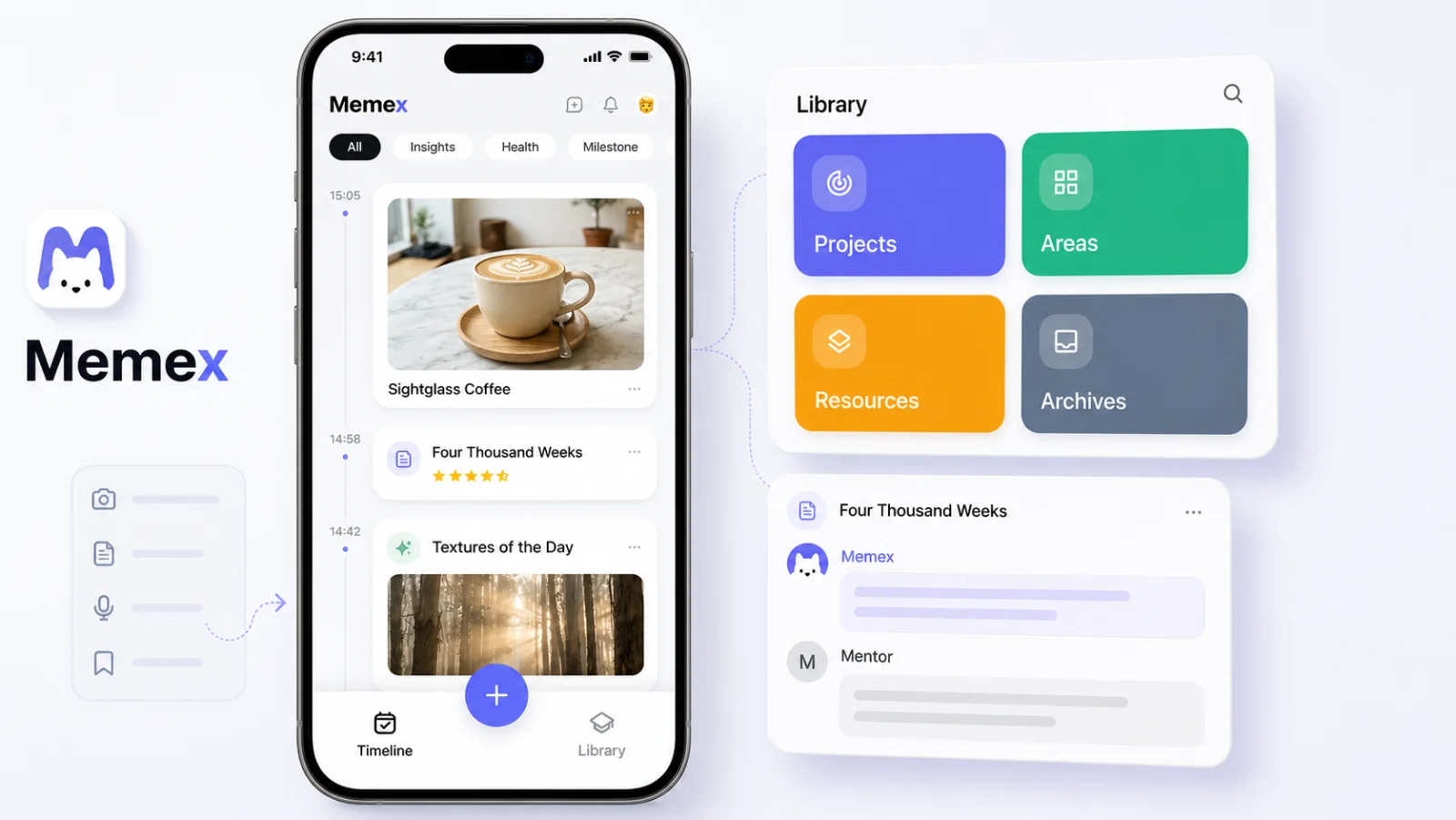
Full disclosure: we built Memex and have placed it first because its background organization is the clearest match for this article's AI-journal focus. We evaluated every app below using the same criteria and have included Memex's limitations here.
Memex started from a different question than most journal apps. We did not ask how to help people write better journals. We asked why recording so often feels lonely. You write a paragraph, take a photo, save a thought, and then it disappears into a timeline with no response, no connection, and no feeling that the app really understood it.
Memex tries to change that. When you record something, whether text, a photo, or a voice memo, a multi-agent AI system responds by organizing what you captured into structured timeline cards, extracting knowledge with P.A.R.A., and surfacing patterns across your records as charts, timelines, and narratives.
Architecturally, the key difference is that you bring your own LLM. Memex supports 12+ providers including OpenAI, Claude, Gemini, Kimi, Qwen, and Ollama. Your prompts go directly from your device to your chosen provider. We do not see your data. Everything is stored locally as Markdown files and a SQLite database, and the codebase is open source under GPL-3.0.
Limitations: It requires an LLM API key, so there is no turnkey built-in AI that works out of the box. The setup is more involved than apps like Day One or Reflection. And the UI is functional rather than luxury-polished.
If you want the longer version of the philosophy behind this product, read why we built Memex and what the architecture actually looks like. If voice capture is the feature you care about most, start with the audio journal app tutorial.
Day One — The cross-platform classic

Day One has been around since 2011, making it the oldest and most established dedicated journal app in this comparison. It remains a classic for a reason: years of refinement have produced a mature, dependable place for keeping one continuous journal.
Its clearest advantage is reach. Day One has native apps for iPhone, iPad, Android, Mac, and Windows, plus a web app for reading, writing, and editing from almost any modern browser. Few dedicated journal apps cover this many devices, and that breadth is one of the strongest benefits of its long history.
The iOS app is where that maturity shows best. It feels fast and native, and the restrained blue-and-white interface keeps long entries, photos, and past memories visually calm.
Limitations: In my testing, the first-run experience did not make the next step obvious: should I create an account, start writing, or configure the journal first? The interface is polished, but its competing navigation and setup choices can make the visual focus feel scattered. It behaves more like a well-engineered digital notebook than a journal with much personality. The more conversational features do not fundamentally change that: Daily Chat requires a Gold subscription, and other AI features sit behind account or paid-plan friction. The Gold tier can also feel expensive if those AI extras are the main reason you are upgrading. Day One is therefore a weaker fit for fragmented capture or for people who want AI to be the main experience rather than an occasional extra.
Apple Journal — The simplest choice in Apple's ecosystem
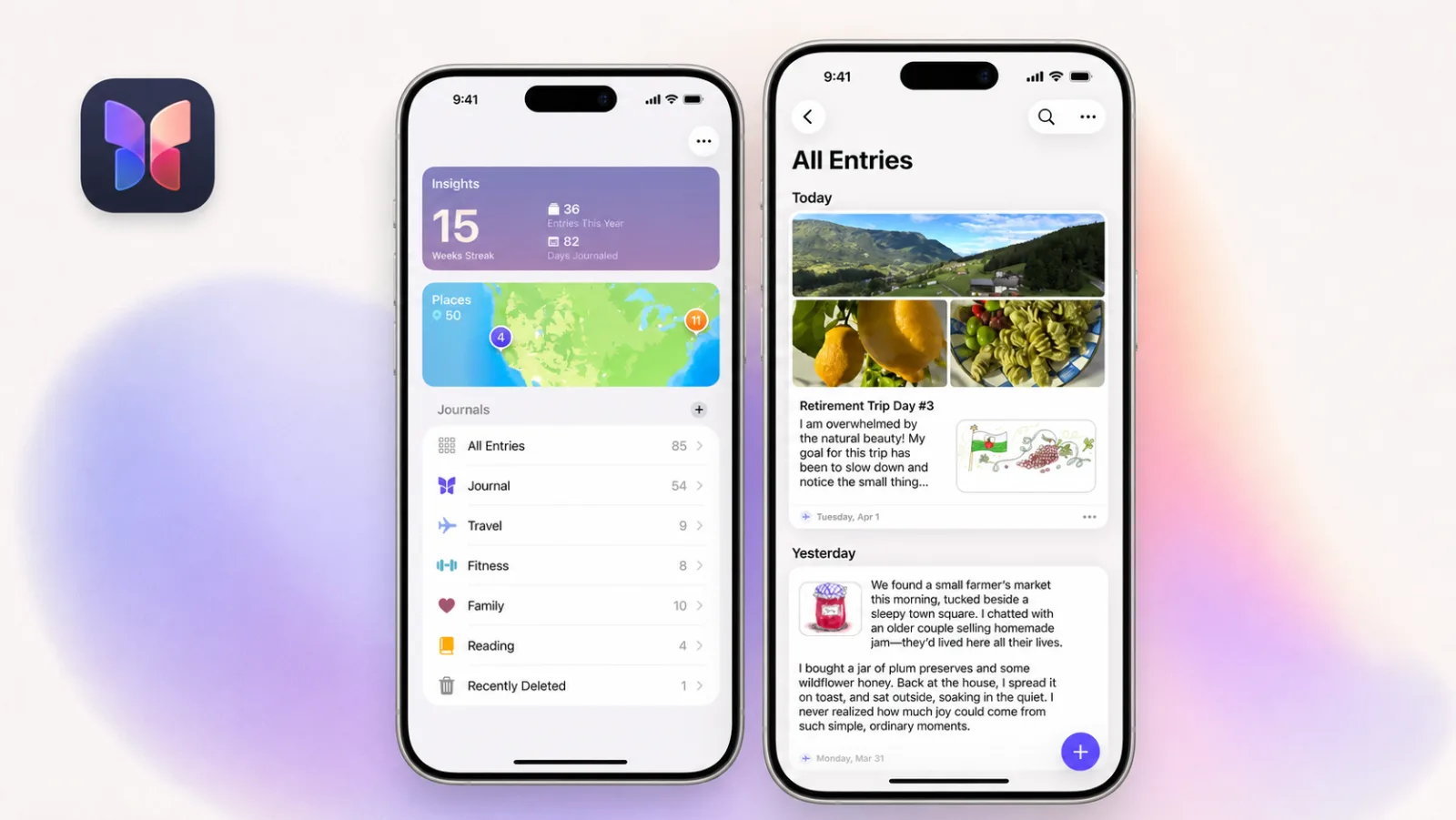
Apple Journal feels exactly like a system-level Apple app. On iPhone and Mac, the animations are fluid, the screens are calm, and the interface stays focused on writing, photos, places, and memories instead of presenting a long list of choices. Backed by iCloud sync across iPhone, iPad, and Mac, it is unusually frictionless for someone who already lives inside Apple's ecosystem.
Journaling Suggestions and Apple Intelligence add prompts and on-device intelligence, but Journal is not yet an AI-first product. That restraint can be a strength if you want a pure journal rather than an AI companion. The existing intelligence is useful; it simply feels like an early layer with more room to develop.
Limitations:Apple Journal is only practical while you remain in Apple's ecosystem. Android and Windows users cannot use it, and switching ecosystems means losing the seamless native experience. Its AI features are also limited to what Apple Intelligence and Journaling Suggestions currently provide. They are not bad; they just do not yet make Journal a strong choice for people who want coaching, cross-entry analysis, or automatic organization to sit at the center of the experience.
Notion — The most capable AI system here, but not really a journal
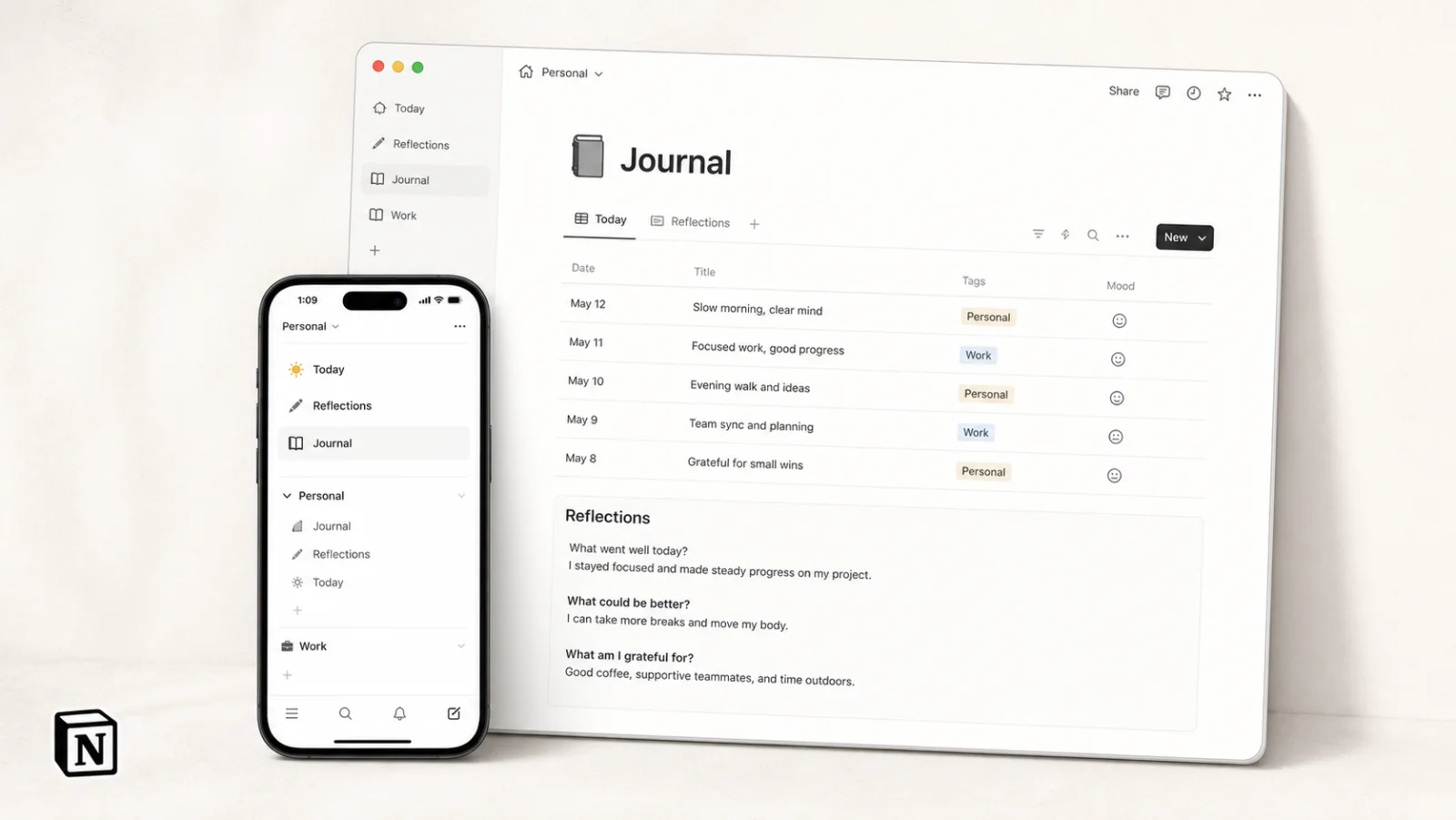
Notion is closer to a personal information management system than a dedicated journal, but there is nothing wrong with using it as one. Pages, databases, templates, relations, and multiple views let you build anything from a plain daily log to a structured archive that connects journal entries with books, projects, habits, and goals.
Its AI capability sits in a different tier from the journal-specific apps in this comparison. Notion AI can draft and edit pages, autofill databases, search the workspace and connected services, run Research Mode, and use Notion Agent to complete multi-step work. Custom Agents go further by running on schedules or triggers, reading approved pages and databases as context, and taking actions in the background. For a mature personal knowledge base, that means the AI can work with far more context than a conventional journal assistant.
Limitations: That intelligence becomes valuable only after Notion has enough information to work with. Building the system, deciding how databases relate, and accumulating a useful history takes real time; a new workspace can feel powerful but empty. It is also expensive if AI is the reason you choose it. The Business plan costs $20 per member per month, while Custom Agents consume additional Notion credits. Notion is therefore a strong long-term information system, but an unnecessarily costly and demanding choice if all you want is somewhere simple to write tonight.
Obsidian — Maximum control, assembly required
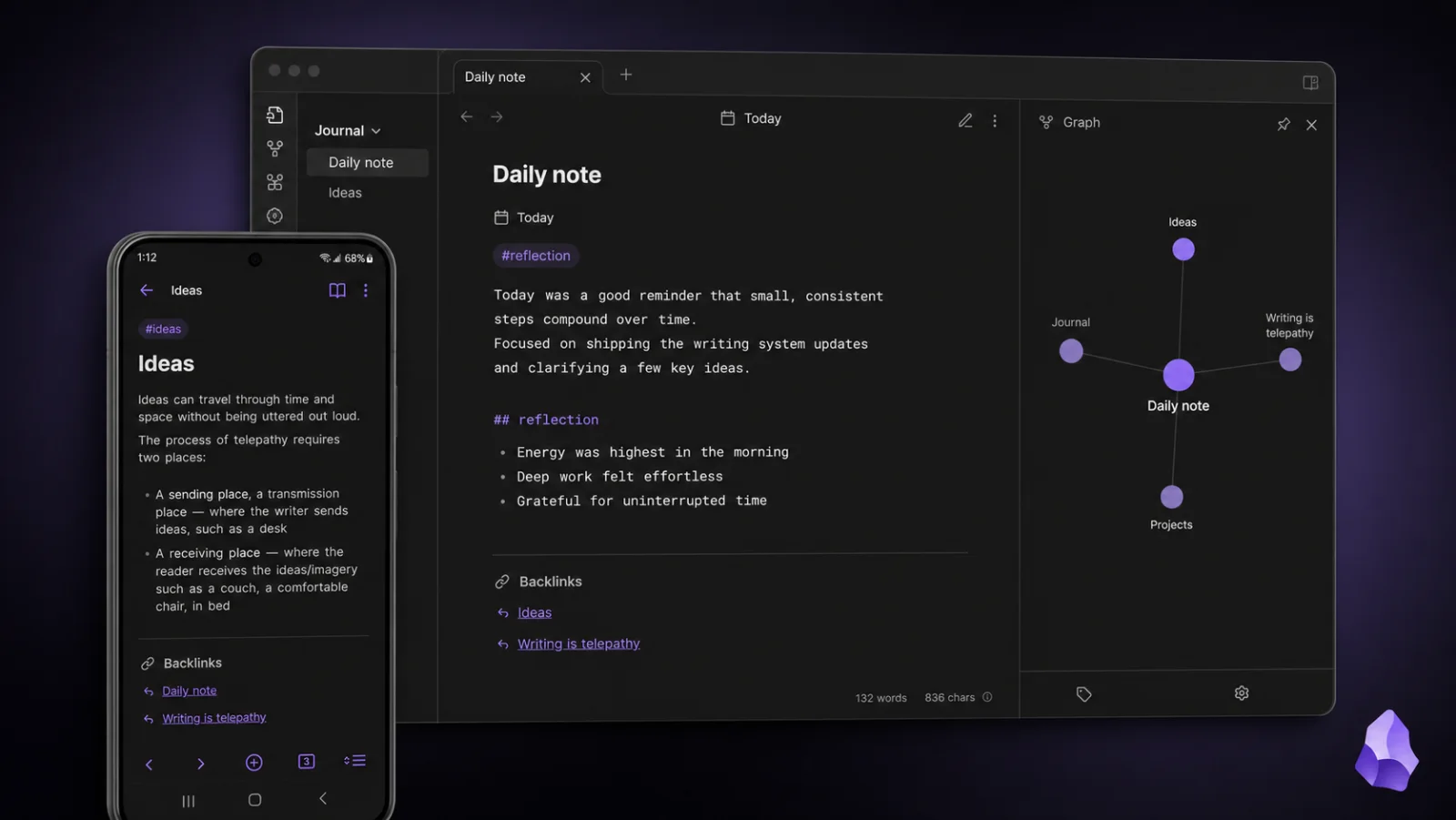
Obsidian is a local-first Markdown editor with a huge plugin ecosystem. For journaling, you can combine Daily Notes with templates and the newer Bases core feature, which turns note properties into database-like views you can edit, sort, search, and filter without moving the underlying content out of plain Markdown files.
Recent releases have also made Obsidian more capable as infrastructure, not just an editor. The official CLI supports scripting and external automation, Obsidian Sync can run through a headless client, and the iOS Share Sheet can capture content into a vault without first opening the app. These are meaningful upgrades for technical users building a long-lived personal system, although they do not make Obsidian a ready-made journal.
AI still comes from community plugins such as Copilot for Obsidian, Smart Connections, or Khoj rather than from a native Obsidian assistant. That keeps the model and workflow flexible, but it also means the user is responsible for choosing, configuring, and trusting each layer.
Limitations: The AI experience is fragmented. Each plugin needs its own API key, stores data differently, and has its own quirks. There is no unified intelligence layer. The mobile app is capable, but the overall experience is still better for people who enjoy setup and iteration than for people who want a finished journaling product out of the box.
If platform fit is the deciding factor, use the dedicated journal app on iPhone and best Android diary journal app guide alongside this broader AI journal comparison.
Reflection — An AI coach that learns from your journal
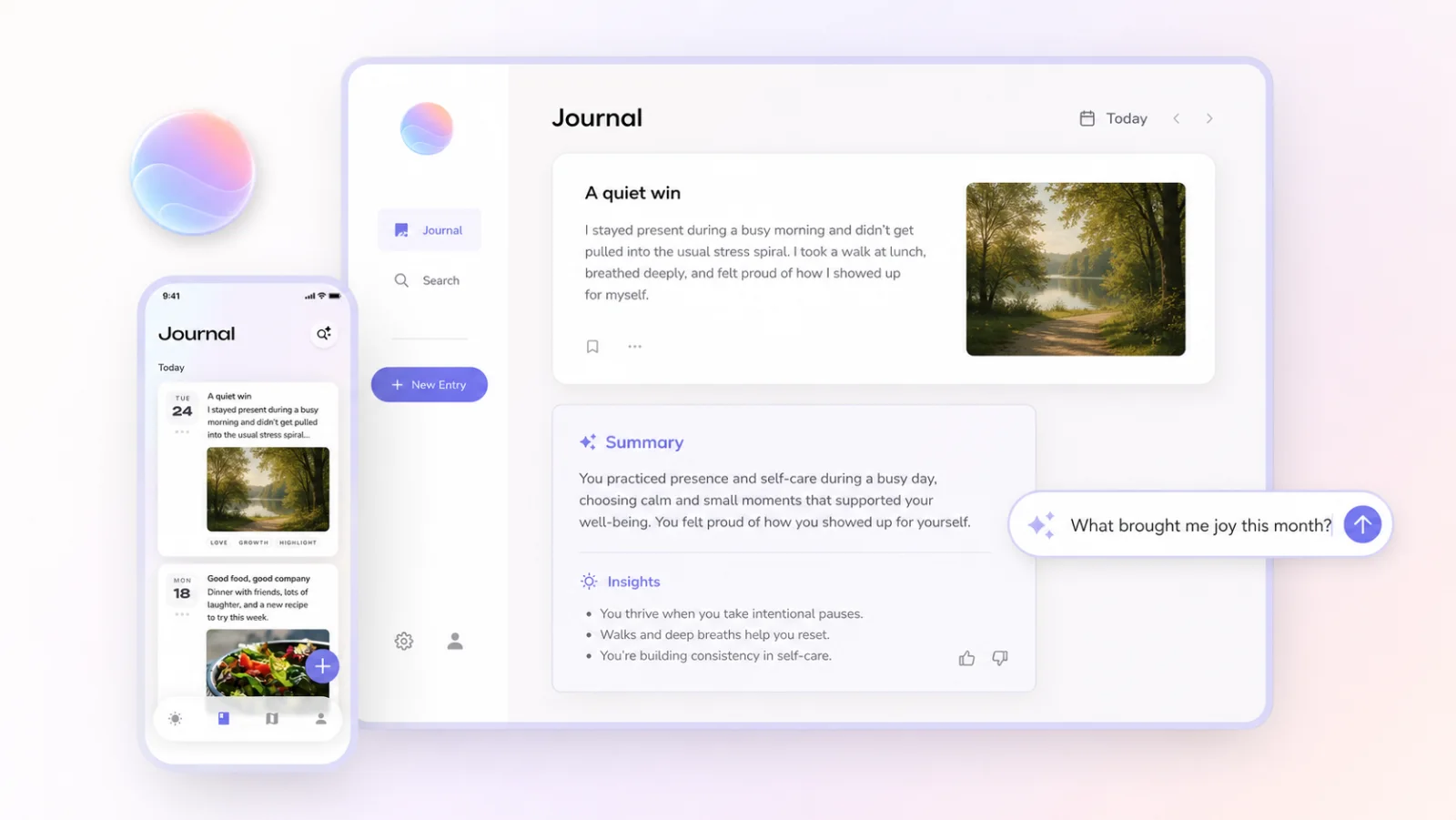
Reflection is purpose-built for guided journaling and personal growth rather than general note taking. Its strongest feature is not a single-entry summary but journal-wide AI search and insight: it can answer questions across past entries, identify recurring patterns, and turn your writing into editable weekly, monthly, and annual reviews.
The newer Inline Coach can respond while you write through text or voice, ask follow-up questions, and weave useful parts of the conversation back into the entry. Reflection also supports free-form voice journaling and can scan handwritten journal pages, making older paper writing searchable alongside new digital entries.
The most unusual 2026 addition is Reflection MCP. It connects the journal to Claude so you can save conversations as entries, ask Claude to find patterns across your writing, or bulk import, tag, and organize older material. Reflection is available on iOS, Android, Mac, and web.
Limitations:The AI is their AI, so you do not choose the model or provider inside the app, and AI queries are processed by Reflection's AI partners. It is not open source. The privacy controls are more thoughtful than they used to be: you can disable AI quick actions, and marking an entry Private excludes it from AI search, insights, themes, and reviews. The center of gravity is still emotional wellness and self-reflection, which is a strength if that is what you want, but limiting if you also want to capture tasks, metrics, places, or general knowledge.
Rosebud — A conversation that turns into patterns and goals
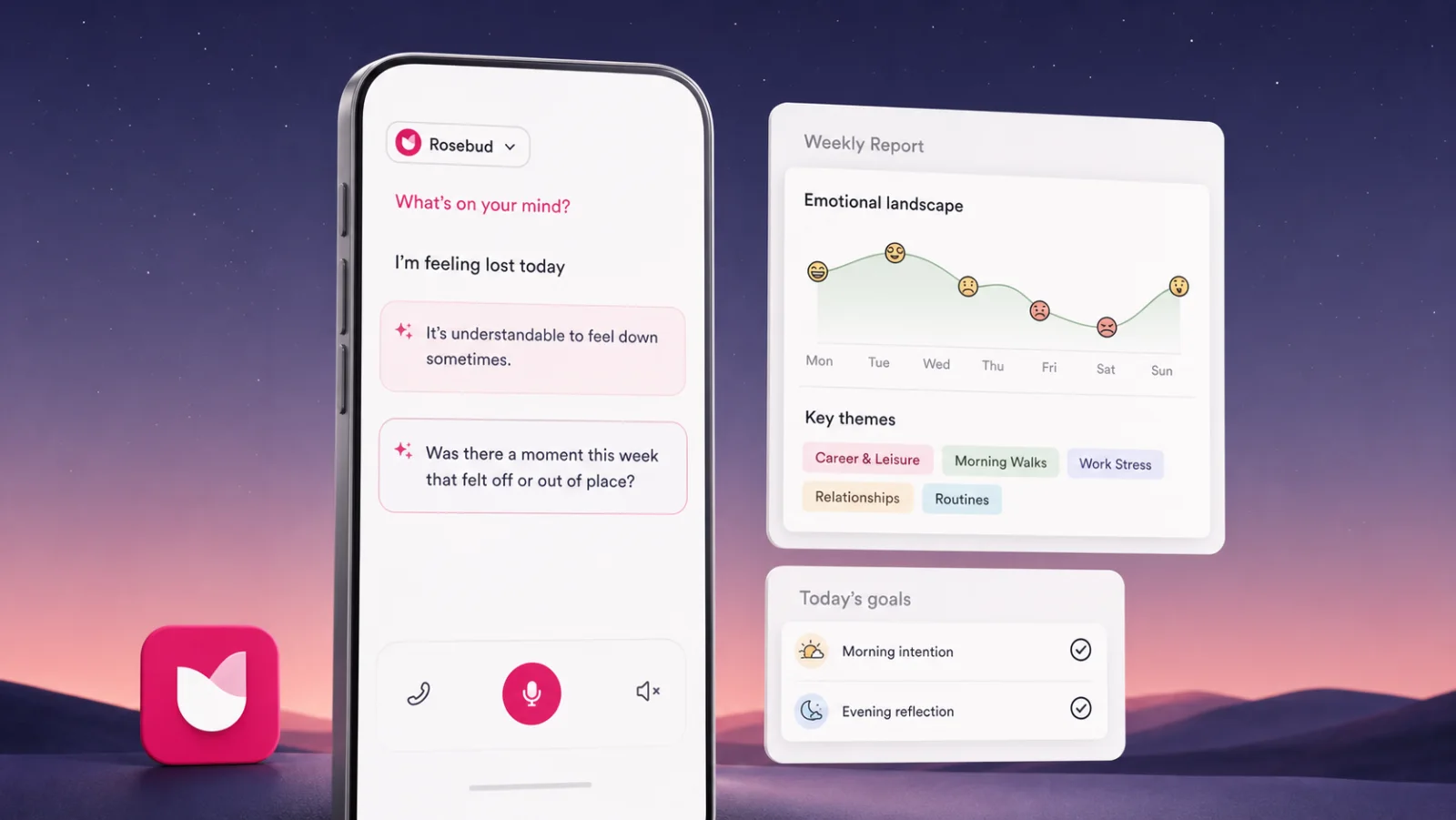
Rosebud starts as a conversation. You write or speak, it responds with a relevant follow-up, and its long-term memory uses earlier entries to connect people, goals, challenges, and repeated topics without asking you to explain the whole context again. The separate Ask Rosebud feature can research the journal and answer broader questions with links back to related entries.
The product becomes more distinctive after a week of use. Its weekly report summarizes writing activity, emotional changes, key themes, and the significant people mentioned in your entries. Morning intentions, evening reflections, suggested goals, and habit tracking then turn those observations into a lightweight action loop. Hands-free voice journaling works in more than 55 languages, which makes Rosebud one of the easier options when talking feels more natural than typing.
Limitations: Premium access is expensive enough that you need to really want the conversational coaching and memory layer. Rosebud is a cloud service; the company says entries are encrypted in transit and at rest, but it does not offer the local-file ownership of Obsidian or Memex. Its own documentation also notes that long-term memory is better at recalling topics than exact dates. Like Reflection, it is focused on emotional growth rather than general-purpose life recording, and it should complement rather than replace professional mental-health care.
How they compare at a glance
Here is the fastest way to think about the category: most apps use AI to help you talk about your journal, while a smaller number try to help you organize your life records.
AI that organizes for you — Memex is the clearest example here. Others either require manual organization, like Obsidian, Notion, and Apple Journal, or focus AI on prompts and emotional analysis, like Reflection, Rosebud, and Day One.
Privacy and data ownership — Memex and Obsidian are the strongest fits if local storage matters. Apple Journal is also privacy-forward, but only inside the Apple ecosystem. Day One, Notion, Reflection, and Rosebud all rely more heavily on cloud models.
Open source— Only Memex. Obsidian's plugin ecosystem is open, but the core product is not.
Model choice — Memex lets you choose the LLM provider. Obsidian can get there through plugins, but it is fragmented. Most other apps abstract the model away entirely.
Data portability — Memex and Obsidian are the cleanest because your data already exists as local files. Day One supports export, but not as a local-first plain-file workflow. Apple Journal has limited portability. Notion exports to Markdown but with formatting quirks. Reflection and Rosebud support export, but they are still fundamentally cloud apps.
Price — Apple Journal is free, Obsidian is effectively free unless you pay for extras, and Memex is free at the app level but shifts cost to your chosen model usage. Day One, Reflection, Rosebud, and Notion become meaningfully useful only once you are comfortable with their paid layers.
Our honest recommendation
There is no single best AI journal app. The right choice depends on what you want the journal to become.
- Want the easiest start? Apple Journal if you are on iPhone, Day One if you want a more mature cross-platform writing experience.
- Want AI-guided self-reflection? Reflection or Rosebud. They are the most purpose-built for that emotional coaching use case.
- Want maximum control? Obsidian with AI plugins. Steep learning curve, but nothing matches the flexibility.
- Want AI that actually organizes your life? That is what we built Memex for: multi-agent organization, local-first storage, open source, and bring your own model.
The real dividing line is not whether an app has AI, but whether that AI matches the sensitivity of what you are writing down. A journal is one of the few product categories where trust, exportability, and model choice matter almost as much as the feature list.
If you mainly want a calm place to reflect, choose the product that makes daily writing easiest. If you want your journal to become a searchable, structured, and evolving record of your life, choose the product built for that job.
FAQ
These are the questions people usually ask before choosing an AI diary or journaling app.
What is the best AI journal app for privacy?
If privacy is your top concern, the strongest fits are Memex, Obsidian, and Apple Journal. Memex and Obsidian keep your journal as local files you control, while Apple Journal benefits from Apple's on-device model and iCloud protections. The tradeoff is that local-first tools usually ask more of you in setup or ecosystem constraints.
Which AI journaling app is best for guided self-reflection?
Reflection and Rosebud are the clearest picks if what you want is emotional reflection, prompts, and an AI companion that helps you go deeper while writing. They feel more like coaching products than life-organization tools, which is a strength if that is the use case you care about most.
What is the easiest AI journal app for beginners?
For beginners, Apple Journal is the easiest start if you are already on iPhone because there is almost no setup. Day One is the next best choice if you want a polished cross-platform journal with a more mature writing experience and are comfortable with a cloud-based product.
Is there an open-source AI journal app?
Yes. Memex is the open-source option in this comparison. It is also the most opinionated about local-first storage and bring-your-own-model architecture, which makes it attractive for people who care about inspectability and data ownership more than turnkey simplicity.
What is Memex AI?
Memex AI usually refers to the AI layer inside Memex, the open-source local-first journal app from Memex Lab. It turns text, photos, and voice records into timeline cards, searchable memories, and organized life context instead of only offering a chat box.
What is the best free journal app for Android?
If you want a free Android journal app with AI organization, Memex is the best fit in this comparison because the app itself is free, supports text, photos, and voice notes, and keeps records local-first. If you only need a simple diary, a basic free diary app may be enough, but it will usually not organize memories with AI.
What is the best AI journal app for Android?
Memex is the strongest Android pick if you want AI agents, voice notes, photos, local-first storage, and searchable timeline cards. Day One is better if you want a polished classic journal, while Reflection and Rosebud are better if you want guided emotional reflection.
Is an online journal the same as an AI journal app?
No. An online journal usually means a web-based diary or cloud account where you can write entries from different devices. An AI journal app adds prompts, summaries, search, pattern detection, or background organization. Some people start with online journal searches but eventually need privacy, export, photos, voice notes, or local-first storage.
If you are still at the early search stage, start with the simpler guide to choosing a free online journal. If you are ready to try the product, download Memex or view the source on GitHub.
Try the local-first pick
Download Memex or inspect the source
Memex is the open-source AI journal in this comparison. Start with the app, or review the GitHub repository if privacy and data ownership are your first filter.