
Obsidian Alternative for AI Journaling: Open Source and Local First
There are usually two reasons to consider an Obsidian alternative. You may already use Obsidian and love owning your Markdown files, but find yourself spending more time deciding where a note belongs than recording the thing you wanted to remember. Or you may be new to personal knowledge management and want the benefits of a durable, private knowledge base without first learning how to build one.
Obsidian starts with text and gives you a vault to shape: write a note, choose a place for it, link it, tag it, and add tools when you need more. That is powerful for people who want their knowledge system to be an intentional craft. It can also turn every small thought, photo, or voice memo into an organization decision.
Memex starts with what happened, not the file that will contain it. Save a short piece of text, a photo, or a voice note; then AI helps turn it into something you can find and use later. The goal is not to make writing less valuable. It is to make it easier to keep a record when life is busy.
We built Memex. That makes us biased. We will be clear about where Obsidian is the better choice.
Quick Take
Choose Obsidian if you enjoy shaping a text-first knowledge system and want control over every layer. Choose Memex if you want an open-source, local-first AI journal where a short fragment is enough to begin and AI handles the first round of organization.
Try the low-effort capture flow
Download Memex and keep the moment before it gets away
Start with text, a photo, or a voice note. Memex keeps the record local, then helps you make sense of it later.
At a glance
| Area | Obsidian | Memex |
|---|---|---|
| Start with | A vault, text files, and the structure you want to build | A moment, thought, photo, or voice note you want to keep |
| Primary job | Write, link, and shape a personal knowledge system | Capture life with low effort, then let AI create useful structure |
| Organization | You decide folders, links, tags, templates, and plugins | AI turns records into cards, tags, links, and knowledge organization |
| Input cost | More deliberate writing and system maintenance | Short text, photos, and voice can be enough to start a record |
| Data format | Plain Markdown files in a local vault | Markdown files and local SQLite, with AI-generated structure |
| Open source | Core is closed source, plugins are open | Fully open source, GPL-3.0 |
| Price | Free (Sync $4/mo, Publish $8/mo) | Free app, you pay only for your own LLM usage |
Obsidian is text-first knowledge work — and that is its strength
Obsidian's core philosophy is sound: it stores notes locally as plain-text Markdown, works without an account, and gives users an extensive plugin ecosystem. Those are real reasons not to leave it casually. An alternative that swaps local files for a locked-in cloud workspace is solving a different problem, not improving the same one.
The plugin ecosystem is genuinely impressive. For AI journaling, you can combine Daily Notes with Templater for structured templates, Dataview for querying your vault, and one of several AI plugins — Copilot for Obsidian, Smart Connections, or Khoj — for chat, search, and note synthesis.
For people who think in systems and enjoy the craft of building a personal knowledge environment, Obsidian is unmatched. That is not flattery. It is the honest assessment.
When maintaining a system gets in the way of keeping a record
Obsidian's extensibility is a strength. It also means an AI workflow is something you choose, configure, and maintain. That is ideal when you want custom behavior; it can be friction when the job is simply “capture this now and make it useful later.”
A plugin-based setup can ask you to decide:
- Which plugins own capture, templates, search, and AI assistance.
- Where model credentials and indexes live.
- How each extension behaves on the devices you use.
- What organization rules to create before you have enough material to organize.
For a person who enjoys making a system, that is part of the appeal. For a person who wants to open a phone, record a thought, and revisit it later with context intact, it is often unnecessary work.
Memex makes the first decision for you
Memex shares some of Obsidian's values — local storage, Markdown files, and no mandatory journal cloud — but makes a different bet about where the user's effort should go. The unit of work is not a note you must design. It is the information you want to preserve.
Instead of putting the system together yourself, Memex has AI built in. It can turn a fragment into a useful card, add helpful labels and connections, and bring related things back together when you need them.
You still choose a model provider — OpenAI, Claude, Gemini, Kimi, Qwen, Ollama, or another supported option — but you do not need to design the organization pipeline before your first record is useful. That lower setup cost matters when the alternative is postponing a thought until you are back at a desk, then forgetting it entirely.
The cost of this integration is less flexibility. You cannot swap out the card generation logic for a custom plugin. You cannot build arbitrary Dataview queries against your records. Memex decides the structure; Obsidian lets you decide everything.
After you save it
A small update can become something useful later.
Here, a quick update about two cats becomes an easy-to-read weight record, while the photos stay with the memory. You do not have to build this layout before you can save it.

Less input matters most when life is happening
Obsidian has a mobile app, and it works. But Obsidian was designed for desktop first. The mobile experience is functional rather than native-feeling. Plugins that work well on desktop sometimes behave differently on mobile. The vault sync story adds another layer of complexity.
Memex is mobile-first. It is a Flutter app built for iOS and Android from the start. The input flow — text, photos, voice — is designed for phone use. Long-press to record audio, release to send. Photos automatically extract EXIF data (timestamp, GPS location) and run through on-device OCR and image labeling via Google ML Kit.
If your journaling happens mostly at a desk, Obsidian's desktop experience is a better fit. If you want to keep a thought while walking, a photo from a trip, or a voice note between meetings, Memex removes the expectation that you first turn it into a polished note. Less input at the start can mean more records survive long enough to become useful.
On your phone
Small choices add up when you are trying to save a moment.
Obsidian is made for writing and shaping notes. Memex is made for getting something down quickly. Neither is wrong — they simply begin in different places.
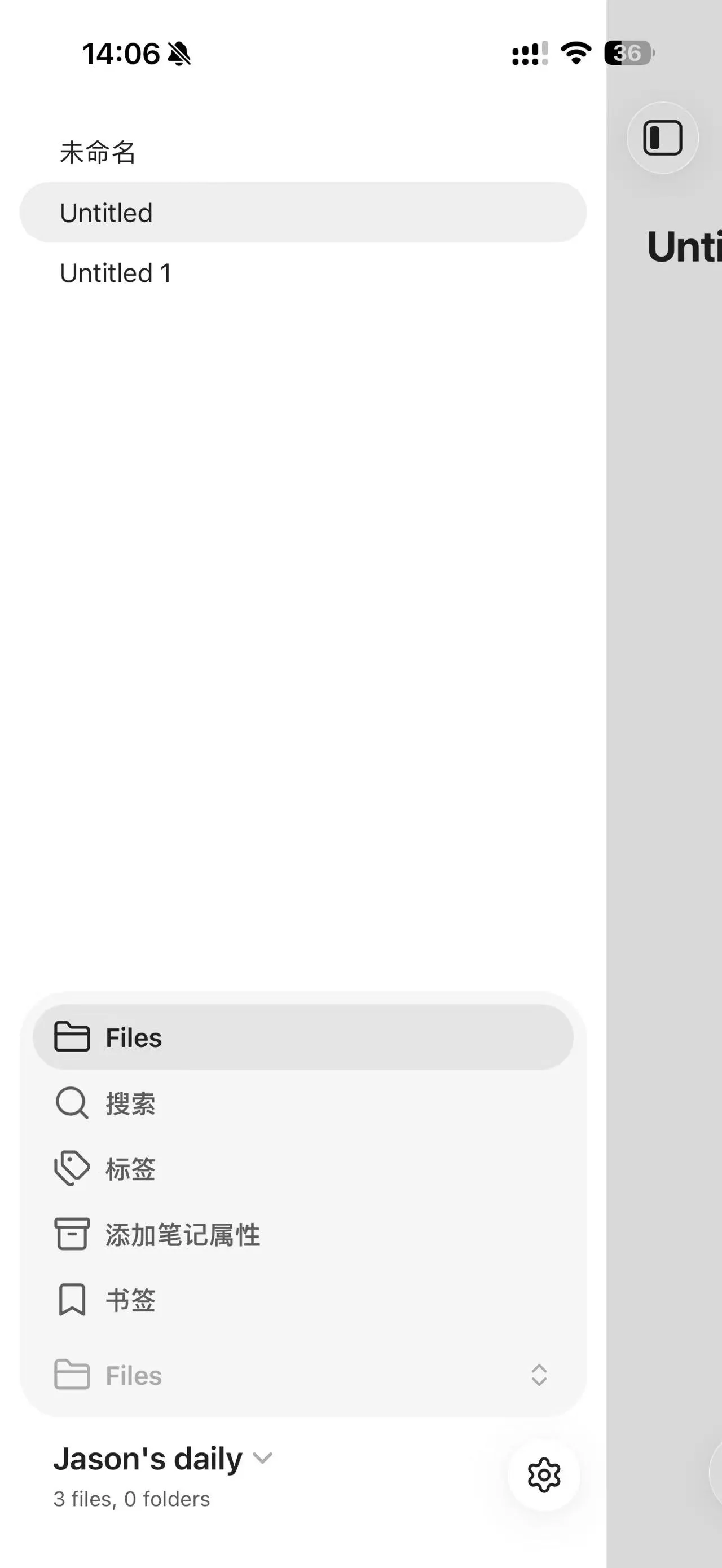
Obsidian: start a note
Great when you want to write, name it, and decide where it belongs.

Memex: send what happened
A short message, photo, or voice note is enough to keep the moment.
Open source: a shared value, different implementations
Obsidian's core application is closed source. The plugin API is open, and the community plugins are open source, but the app itself is proprietary. This is a reasonable business decision, but it means you cannot inspect or modify the core behavior.
Memex is fully open source under GPL-3.0. The entire codebase — the agent system, the LLM client abstraction, the card generation logic, the knowledge organization — is on GitHub. You can read it, fork it, or contribute to it.
For most users this does not matter day to day. For people who care about auditability, long-term trust, or the ability to inspect and modify the product, it is a meaningful difference.
Which one fits how you like to keep things?
Stay with Obsidian if:
- You enjoy building and maintaining your own knowledge system.
- You primarily work on desktop and want the deepest plugin ecosystem.
- You want full control over every aspect of how your notes are structured.
- You are comfortable managing multiple AI plugins and API keys.
Try Memex if:
- You want local Markdown storage with AI that provides useful organization from the first capture.
- You capture life on your phone more than at a desk.
- You want a unified agent system instead of assembling plugins.
- You value fully open source software you can inspect end to end.
You may not need to replace Obsidian at all
Honestly, Obsidian and Memex serve different workflows more than they compete for the same one. Obsidian is a knowledge workbench. Memex is a life capture system. Some people use both — Memex for daily recording on the phone, Obsidian for longer-form thinking at the desk.
The question is not which app wins on a checklist. It is which job you are trying to do. If the answer is "I want AI to organize daily life fragments without first building a system," Memex is the more direct path. If the answer is "I want to shape every layer of my knowledge environment," Obsidian remains the stronger choice.
If you want a broader comparison, read our guide to AI journal apps. If Markdown matters most, our Markdown journal guideexplains the tradeoffs in plain language. For the philosophy behind Memex, see why we built it. To get started, try Memex or browse the source.
Open source and community
Read the source, follow releases, or join people comparing real journaling and note-taking workflows.
FAQ
Is Obsidian good for journaling?
Yes, if you are comfortable with plugins and configuration. Obsidian with Daily Notes, Templater, and an AI plugin can be a powerful journaling setup. The tradeoff is that you assemble and maintain the system yourself, and the mobile experience is weaker than the desktop one.
What is the best Obsidian alternative with built-in AI?
For journaling specifically, Memex is an open-source alternative that shares Obsidian's local-first and Markdown-based philosophy but adds built-in AI organization without requiring a plugin stack. For general note-taking with AI, other tools may fit better depending on whether you value collaboration, desktop authoring, or a hosted workspace.
Does Memex use Markdown like Obsidian?
Yes. Memex stores all records as interconnected Markdown files on your device, similar to an Obsidian vault. The difference is that Memex generates and organizes those files through AI agents rather than expecting you to manage the file structure manually.
Can I use Obsidian and Memex together?
They serve different purposes, so yes. Some users capture daily life in Memex and use Obsidian for longer-form knowledge work. Both support Markdown-based records, but they are separate applications and are not designed to share a live folder or sync state with each other.