
Best AI Journaling App for Android (2026)
By Clifford · Product research
The three Android questions to answer first
Android is not simply another download badge. People choose it for device choice, file access, and more control over where their data goes. A journal app should respect those expectations before it asks you to trust it with private thoughts, photos, and voice.
- Does it properly support Android? Look for a native Android app with the capture methods you use—not a limited mobile viewer for a desktop product.
- Where does the journal live? Check whether the primary copy is on your device, whether a sign-in is required, and what happens when the app is offline.
- How do you keep or move it? Before you write for months, understand backup, restore, export, and whether the product offers real-time sync or a portable archive instead.
Try Memex on Android
Keep your journal on your Android phone, with a way to take it with you
Capture text, photos, and voice locally, then choose how you back up, restore, and route AI requests.
Android support, privacy, and portability
| Android question | What to look for | How Memex works | Important boundary |
|---|---|---|---|
| Android support | A real Android app, not a reduced companion to desktop | Google Play app for text, photo, and voice capture | Check the app on your own device before moving an archive |
| Private storage | Know where journal files live and whether an account is mandatory | Local Markdown files and SQLite; no Memex account or journal server | A model provider still receives requests you choose to send |
| Backup and restore | Have a way to leave, replace a phone, or move an archive | App storage, custom folder, or iCloud Drive plus one-tap full backup and restore | This is portable backup and restore, not claimed live two-way sync |
| AI | Make old Android records easier to find and understand | Organizes text, photos, and voice into cards, links, and insights | AI is useful only after capture, privacy, and portability are right |
Memex makes Android the primary home for your journal
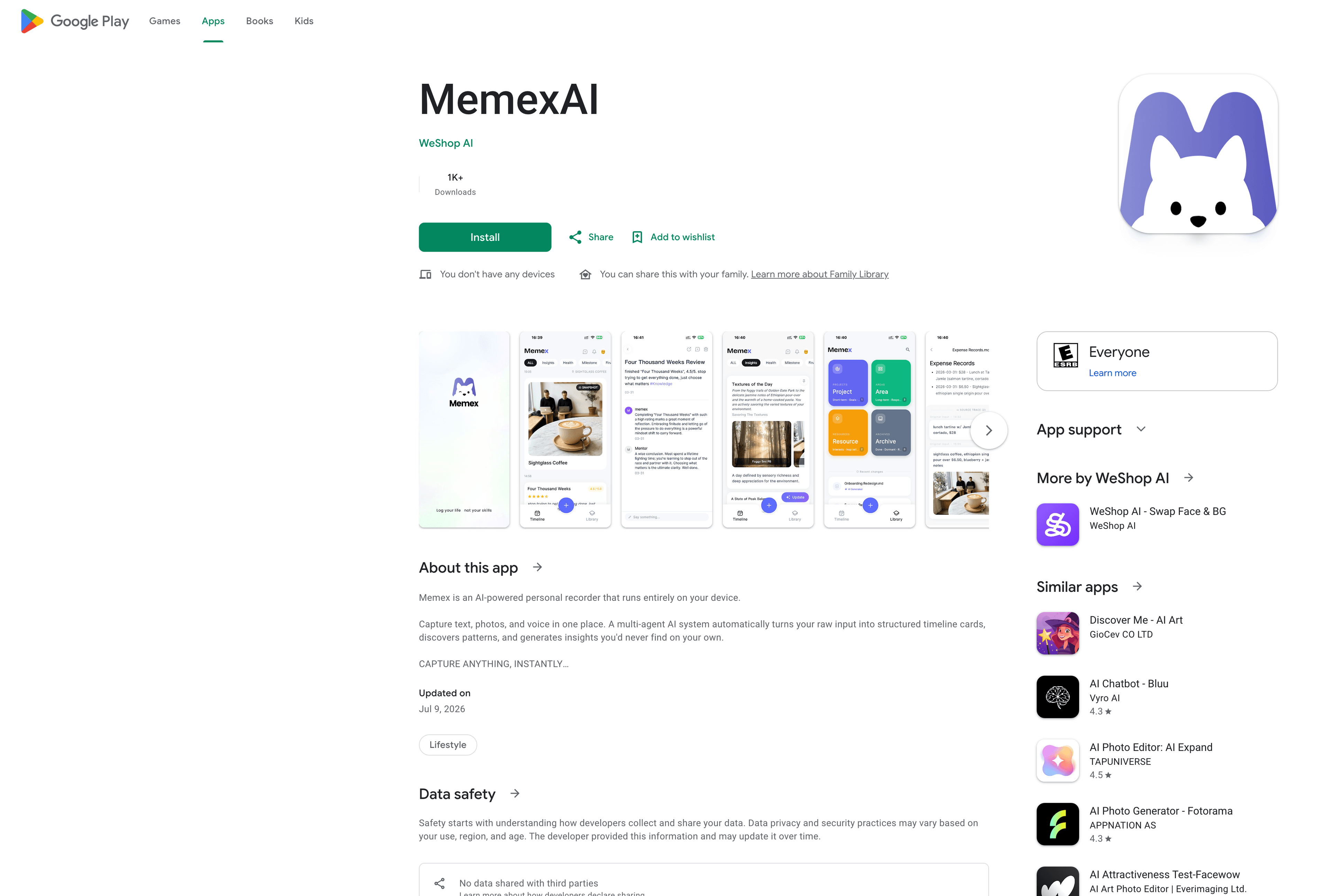
Memex is available on Google Playand built for mobile capture across text, photos, and voice. Your records, cards, and knowledge are stored locally as Markdown files and a SQLite database, so an Android phone is not just a funnel into someone else's cloud. You can also lock the app with biometrics.
This is where Android's openness is valuable. You can use app storage, choose a custom folder, or use iCloud Drive for your storage and backup choice. The important point is not that every option is identical; it is that the primary record remains yours to inspect, export, and restore instead of being locked inside a mandatory Memex account.
For technical Android users, Memex is open source. Android's more open app and file ecosystem makes that practical: you can inspect how storage and AI routing work, build a custom version, or contribute your own capture and automation ideas instead of treating the journal as a black box.
You do not need to write code to use Memex, and custom changes still need someone to maintain them. But if you want your Android journal to adapt to your workflow over time, source access gives you an option that a closed, account-bound journal cannot.
How Android backup and cross-platform access work
Memex offers one-tap full backup and restore. You can keep data in app storage, a custom folder, or iCloud Drive, and share a full backup to Google Drive or another location when you need to move it. That gives you a practical path from Android to a new phone or another platform without giving up the original archive. The privacy benefit is that your primary journal does not need to live in a permanent Memex cloud account: the working record stays on your device, and you decide when and where to create another copy.
That changes the privacy and security trade-off. A managed sync service can be a good choice, especially when it offers strong encryption, but it normally makes the provider and its account system part of the path your journal takes between devices. With Memex, fewer copies are created by default, you choose the backup destination, and you can keep a complete archive even if you stop using the app. Your backup destination still needs its own protection—for example, a secure Google Drive account—but custody is visible and under your control rather than assumed.
A necessary distinction: this is a portable backup-and-restore model, not a claim of continuous live two-way sync across every device. If seamless cloud sync is your non- negotiable requirement, choose a product built and documented for that workflow. If data ownership and reducing mandatory cloud custody are the priority, local storage plus a visible backup path is often the better trade-off.
AI comes after the Android fundamentals
Once platform support, privacy, and portability are right, AI can do useful work: turn a voice thought, photo, or short note into structured timeline cards; connect related fragments; and help you find patterns across what you captured. You choose the AI provider, so prompts go directly from your device to that provider rather than through a Memex AI service.
Full disclosure: we build Memex. It is a strong fit if Android is your primary capture device and you want AI without a mandatory journal cloud. It is not the right fit if you only want a blank page for polished daily writing, a fully managed AI coach, or guaranteed always-on two-way cloud sync. For the broader category, read best AI journal apps.
How Memex compares with other Android AI journal apps
Android support alone does not make these apps interchangeable. Day One, Obsidian, Reflection, and Rosebud all support Android, but they make different trade-offs around where your journal lives, how it moves between devices, and whether AI acts as a coach, a toolkit, or an organizer. Memex is strongest when Android is your primary capture device and you want the original archive to stay local-first.
| Android app | What it does well | Where Memex is different | Pick it when |
|---|---|---|---|
| Day One | A polished classic journal with Android, encrypted cloud sync, rich media entries, and optional AI-guided Daily Chat. | Memex is stronger when you want the primary archive to remain local Markdown and SQLite files, without a required Memex cloud account or a single built-in AI provider. | Choose Day One if seamless managed sync and a refined long-form writing experience matter most. |
| Obsidian | A local Markdown vault on Android, with a choice of device or app storage and flexible sync methods. | Memex starts with phone-first text, photos, voice, cards, and AI organization instead of asking you to design a vault, plugins, and capture workflow yourself. | Choose Obsidian if deep customization is the point of the system. |
| Reflection | An Android AI coach with guided prompts, insights, and managed sync across Android, iOS, Mac, and web. | Memex is the better fit when your priority is a locally inspectable life record and a clear boundary between your journal and the AI provider you select. | Choose Reflection if you want the app to lead a reflective writing practice and give coach-style responses. |
| Rosebud | An Android AI journal centered on guided reflection, voice journaling, goals, and patterns in your writing. | Memex is more focused on capturing a broader, searchable record of life—text, photos, voice, schedules, and reminders—while keeping the primary archive local-first. | Choose Rosebud if emotional reflection and a conversational growth coach are the main job. |
This is not a claim that Memex wins every use case. Day One has the smoother managed-sync experience; Obsidian gives you more room to build; Reflection and Rosebud go deeper on guided reflection. The practical advantage of Memex is that it combines a real Android capture app with local records, portable backup and restore, and AI that organizes the material you choose to send—rather than making an account-bound cloud archive the starting point.
Source and community
Inspect the open-source app, follow releases, or join Discord to talk about Android journaling, photos, voice capture, reminders, and local-first AI memory.
FAQ
What is the best AI journaling app for Android?
Memex is the strongest fit if you want Android to be the primary home for your journal: the app is available on Google Play, records stay local-first, and AI can organize text, photos, and voice into searchable timeline cards. It is less suitable if you need a fully managed cloud journal with live two-way sync across every device.
Is Memex available as an Android app?
Yes. Memex is available on Google Play and is built for iOS and Android. It supports text, photo, and voice capture in the mobile app, so Android is a primary product surface rather than a browser-based companion.
Where does Memex store Android journal data?
Memex stores records, cards, and knowledge on your device as Markdown files and a local SQLite database. You can use app storage, a custom folder, or iCloud Drive for storage and backup choices. No Memex account or Memex-hosted journal server is required.
How do I back up or move a Memex journal to another platform?
Use the one-tap full backup and restore flow. Memex supports iCloud Drive, a custom folder, and app storage; a full backup can also be shared to Google Drive or another location. Treat this as a portable backup-and-restore path, not a promise of continuous real-time two-way sync.
How does Memex protect private Android journal entries?
The primary record stays on your device, and the app supports biometric locking. When you use AI, prompts go directly to the model provider you choose, so you should review that provider's privacy terms as a separate decision from where your journal is stored.
Is Memex free on Android?
The Memex app is free to download. AI usage depends on the model provider you choose; some providers offer free tiers, while others charge for usage.
Is Memex available on Android?
Yes. Memex is available on Google Play and is built as a local-first AI journal for mobile capture across text, photos, voice, reminders, and timeline cards.
Final thought
The best AI journaling app for Android should first respect Android itself: a real app, private local records, and a visible path to back up or move your history. Once those are true, AI can help make the life you captured easier to understand.