
Intelligent UI: How Memex Turns Notes into Visual Cards
By Clifford · Product research
Intelligent UI means AI can choose a useful way to show information: a chart for a trend, a timeline for a trip, or a visual guide for something you want to learn. Instead of reading every answer as a long paragraph, you can see the structure at a glance.
Memex has been applying this idea to personal records for months. Its public code history contains built-in visual cards in March 2026 and custom card design in June, before OpenAI’s October 7 Intelligent UI announcement. Here is what that means for someone using an AI journal, with a real Memex example.
Why Intelligent UI is in the news
On October 7, 2026, OpenAI introduced GPT‑6 and Intelligent UI in ChatGPT. Its announcement describes answers that combine text, visuals, and interactive elements according to the question. For a user, the useful change is simple: the answer can arrive in a form that helps you understand or use it.
Memex approaches that idea through personal memory. The question is how to make your notes, photos, and reflections easier to return to. A visual card can give a record a clear title, group related details, and highlight what matters without making you read the same information twice.
A real example: a Mahjong guide in one card
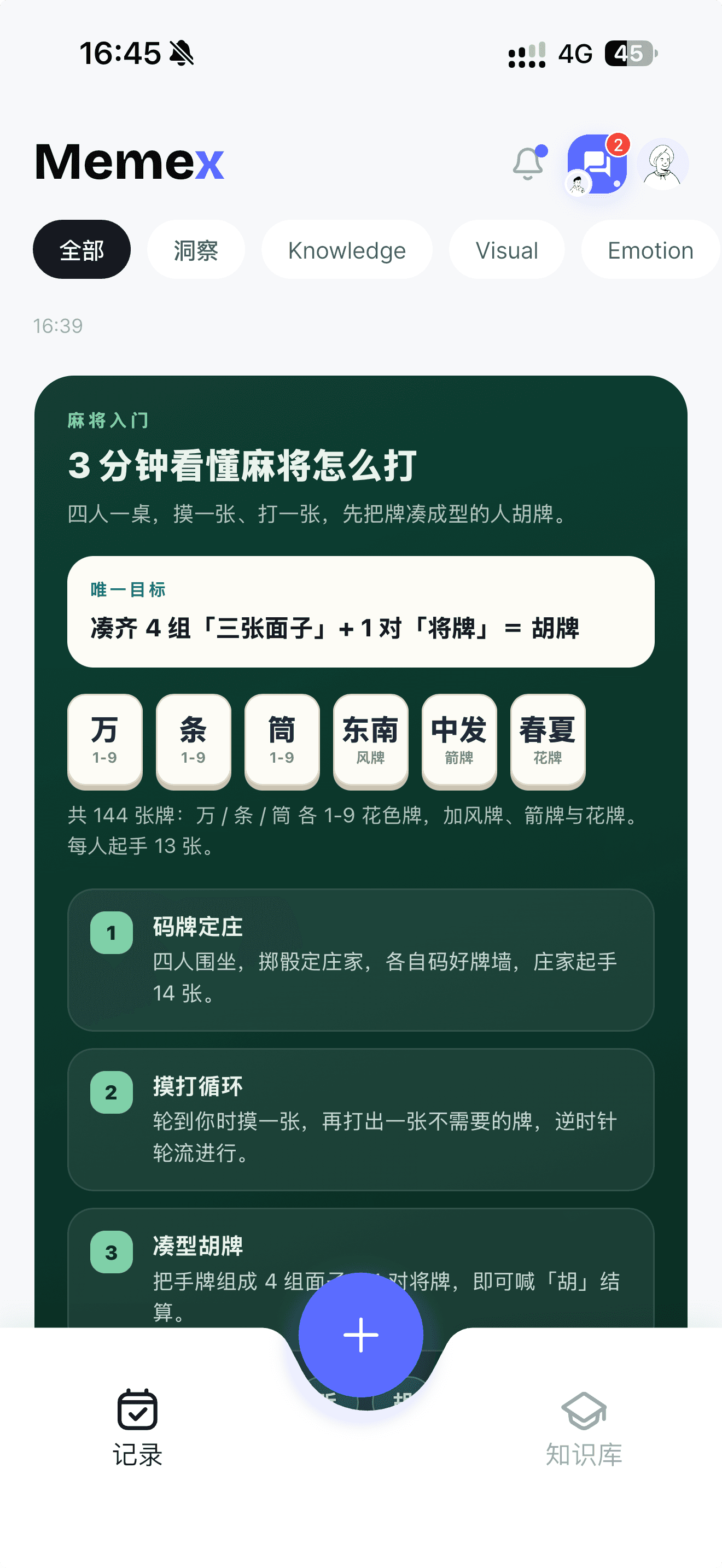
The screenshot below shows a Mahjong introduction inside Memex. A dark green card brings together the aim of the game, tile categories, and three numbered steps. These are distinct pieces of information, so they get distinct places in the layout.
That is the everyday value of a generated interface. Someone learning the basics can find the goal first, scan the tiles next, and follow the sequence. The screenshot is an actual product view supplied by the owner on October 9, 2026; it shows the result, rather than the full process that created it. Its rules are simplified for an introduction, and Mahjong variants differ.
Where visual cards help in an AI journal
Think about the records you might want to revisit after a busy week. Photos from an outing work well together in a gallery. Events from a trip are easier to follow in time order. Repeated workout records can support a trend chart. A purchase is easier to identify when its amount and description are grouped in a transaction card.
These are examples of formats supported by Memex’s card system, rather than a promise that every note will become a chart automatically. A useful summary still needs enough relevant records. A chart should make those records clearer; it should not turn missing information into a confident conclusion.
The benefit is most visible when you return to a record. You do not have to remember where a detail was buried in a paragraph. The layout gives you a way into it. For simple thoughts, a short text note can still be the best choice.
How an AI journal organizes your records · Using photos in a journal
How Memex builds the view, in plain language
First, the AI chooses from layouts the app already knows how to display. A photo layout keeps pictures together, while a trend layout makes a sequence easier to compare. Starting with these familiar designs helps the result stay readable on a phone.
When those designs do not fit, or you ask for a different visual style, Memex can create a custom card layout. The layout is kept separate from the words and values that fill it, so it can be reused for suitable records. Creating a design and saving a record are separate steps: the finished card needs both.
The current app also gives the AI a way to preview a custom design before saving it, when the device supports that preview. It can look for clipped content, poor contrast, or awkward spacing. Additional checks reject unsupported content. These checks help, but they do not guarantee that every generated card will be perfect.
For insights drawn from several records, Memex can keep links to the source records. That matters because a polished chart is only useful if the information behind it can be checked. The view should make your memory easier to explore, rather than harder to question.
For getting records into your journal, try voice journaling; for finding them later, explore a searchable life record.
How much earlier did Memex have this?
Two dates are supported by the public repository. March 11, 2026: the initial source snapshot already contains built-in visual cards, insight charts, and the system that displays them. June 10, 2026: a later snapshot contains the ability to design custom Timeline cards.
Those dates are about seven months and four months before OpenAI’s October 7, 2026 announcement. They make “Memex explored this earlier” a specific, checkable statement. They establish that the implementation existed in the code, rather than the release date of every App Store or Google Play version.
The comparison is to this named Intelligent UI launch. It is not a claim that Memex invented all AI interfaces or was earlier than every visual or interactive feature OpenAI has released.
How Memex and ChatGPT’s Intelligent UI differ
The shared idea is letting AI choose a presentation that fits the content. The focus differs. Memex uses visual cards to organize personal records and insights. OpenAI’s announcement also describes interactive experiences, such as calculators and games, inside a conversation.
Memex’s custom Timeline cards are designed for display. They are not miniature apps with arbitrary forms or working buttons. Actions that affect the device or records belong to the app’s corresponding tools. A Mahjong guide card, for example, is a visual explanation rather than a playable game.
Memex can work with different model providers, so visual card quality depends on the model you choose and the information it has. Our implementation is an app-level approach to this product idea; it should not be read as a claim that the two products share identical training or capabilities.
What local-first means for your privacy
Memex organizes records and card designs around your local workspace. That supports ownership of your personal memory and keeps the stored record close to you.
Storage and AI processing are separate choices. If you select a cloud model, the context needed for a task is sent to that provider. If you use a local model, the setup must support it. A card appearing on your phone does not, by itself, mean all processing happened there. Choose your model with that distinction in mind.
Memex privacy policy · Choosing a local model for journaling
For the storage side of this choice, see how local-first storage works.
Try it with a record you actually want to revisit
Start with a note, a few photos, or a voice recording that has something worth keeping. Then ask for a suitable view: for example, “Show these moments as a timeline” or “Make this explanation easier to scan.” These are suggestions for expressing your intent, rather than guaranteed commands with identical results on every model.
Check whether the layout helps you find the important information. For a recap, compare the summary with its source records. If a visual is crowded or unnecessary, keep it simpler. Intelligent UI earns its place when it makes something easier to understand, remember, or use.
If you need a starting point for a recap, use daily reflection questions to decide which moments matter.
Questions about Memex’s Intelligent UI
Do I need GPT‑6 to use Memex’s visual cards?
Memex’s card system is part of the app and supports different model providers. It does not require this ChatGPT release. Results depend on your chosen model, available context, and setup.
Can I play the Mahjong game shown in the screenshot?
This card is an illustrated introduction. It does not demonstrate a playable game, and its simplified rules should not be treated as a complete guide to every Mahjong variant.
Does AI make every note visual?
A visual layout is useful when it clarifies the content. A short thought may work best as text, while photos, sequences, and repeated measurements can benefit from other formats.
Sources and implementation evidence
OpenAI’s October 7 announcement
March 11 source snapshot: built-in visual cards